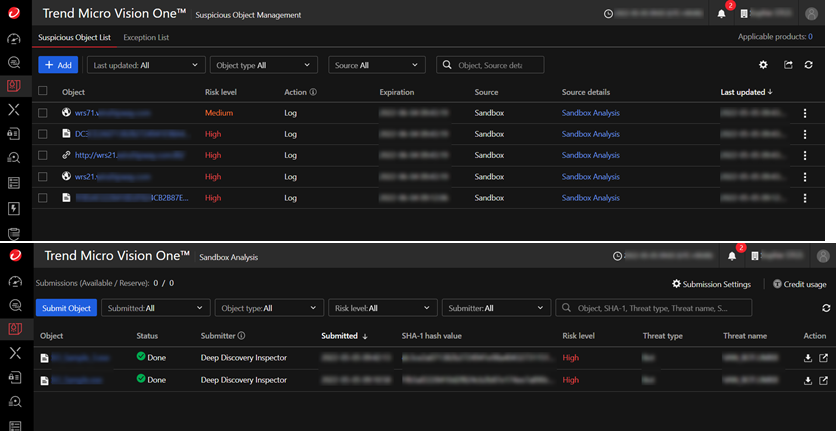
Integrate the Deep Discovery Inspector virtual appliance with Sandbox as a Service to send object data to TrendAI Vision One™.
Integrating Deep Discovery Inspector with Sandbox as a Service allows your deployed
appliances to share suspicious objects and analysis data with TrendAI Vision One™. Objects normally sent to
the Virtual Analyzer for analysis are instead analyzed in the cloud by Sandbox as
a
Service. The results are sent to Sandbox Analysis where they can be viewed. Additionally, suspicious
objects are sent to Suspicious Object Management.
 |
NoteConnecting to a Service Gateway is not required to integrate with Sandbox as a
Service.
Objects analyzed by Sandbox as a Service do not count towards the daily reserve
for Sandbox Analysis.
|
 |
ImportantYou must have an activated Sandbox as a Service license to integrate with TrendAI Vision One™. If you do not have a
license for Sandbox as a Service, contact your support provider to obtain a
license.
Additionally, if you deployed a disk image that was not specific to your
organization, you must activate
your Deep Discovery Inspector license before integrating with Sandbox
as a Service.
|
Procedure
- In the TrendAI Vision One™ console, go to .
- Find the appliance you wish to integrate and click Access to sign in to the Deep Discovery Inspector management console.
- In the Deep Discovery Inspector console, go to .
- Select Sandbox as a Service from the Virtual Analyzer list.
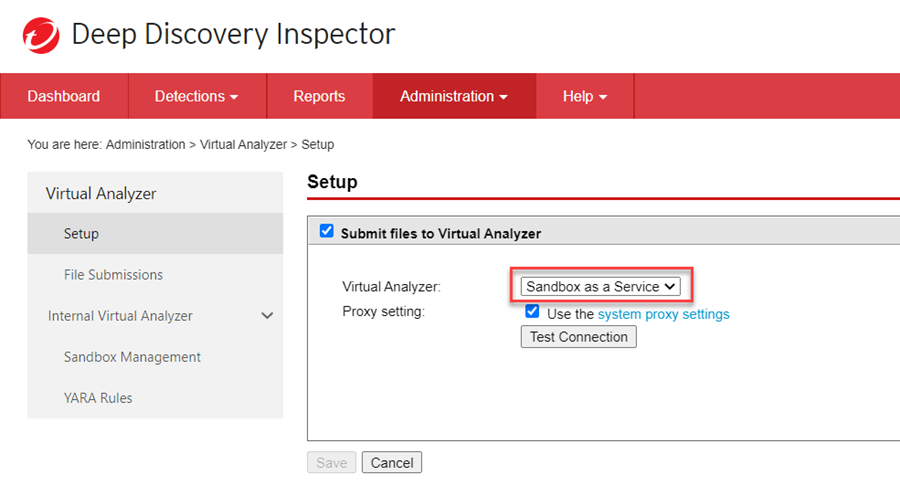
- Click Save.Sandbox as a Service starts sending Virtual Analyzer Suspicious Objects and Virtual Analyzer Results to TrendAI Vision One™. Virtual Analyzer Suspicious Objects are visible in Suspicious Object Management, Virtual Analyzer Results are visible in Sandbox Analysis.