


The TrendAI Vision One™ API Security plugin for Kong Gateway delivers risk visibility for your Kong Gateways
and protects their cloud-hosted infrastructure through TrendAI Vision One™ Cloud Risk Management and Container Security. The plugin connects your Kong environment
to the TrendAI Vision One™ platform and is intended for TrendAI Vision One™ customers.
 |
NoteThe TrendAI Vision One™ API Security plugin is not yet publicly available. To access the plugin, contact
your TrendAI Vision One™ account team or send a request to
alloftrend3rdpartyintegrations@trendmicro.com. |
Key capabilities include:
-
API discovery and risk assessment: Discover Kong Gateways and their associated APIs, including checks for misconfiguration, authentication status, zombie APIs, and internet exposure.
-
Cloud infrastructure mapping: Map Kong Gateway within your cloud infrastructure to show its location and surrounding context. This visibility helps you understand the cloud environment around Kong Gateway and protect the underlying cloud infrastructure. Requires TrendAI Vision One™ Cloud Risk Management and Container Security licenses.
When enabled, the plugin periodically collects Kong Gateway configuration data, including
routes, services, upstreams, targets, and plugins, and sends it to TrendAI Vision One™ for analysis and cloud infrastructure mapping. TrendAI Vision One™ then generates an API inventory, detects API Gateway misconfigurations, and correlates
the Kong data plane node's compute instance with your cloud infrastructure through
Cloud Risk Management.
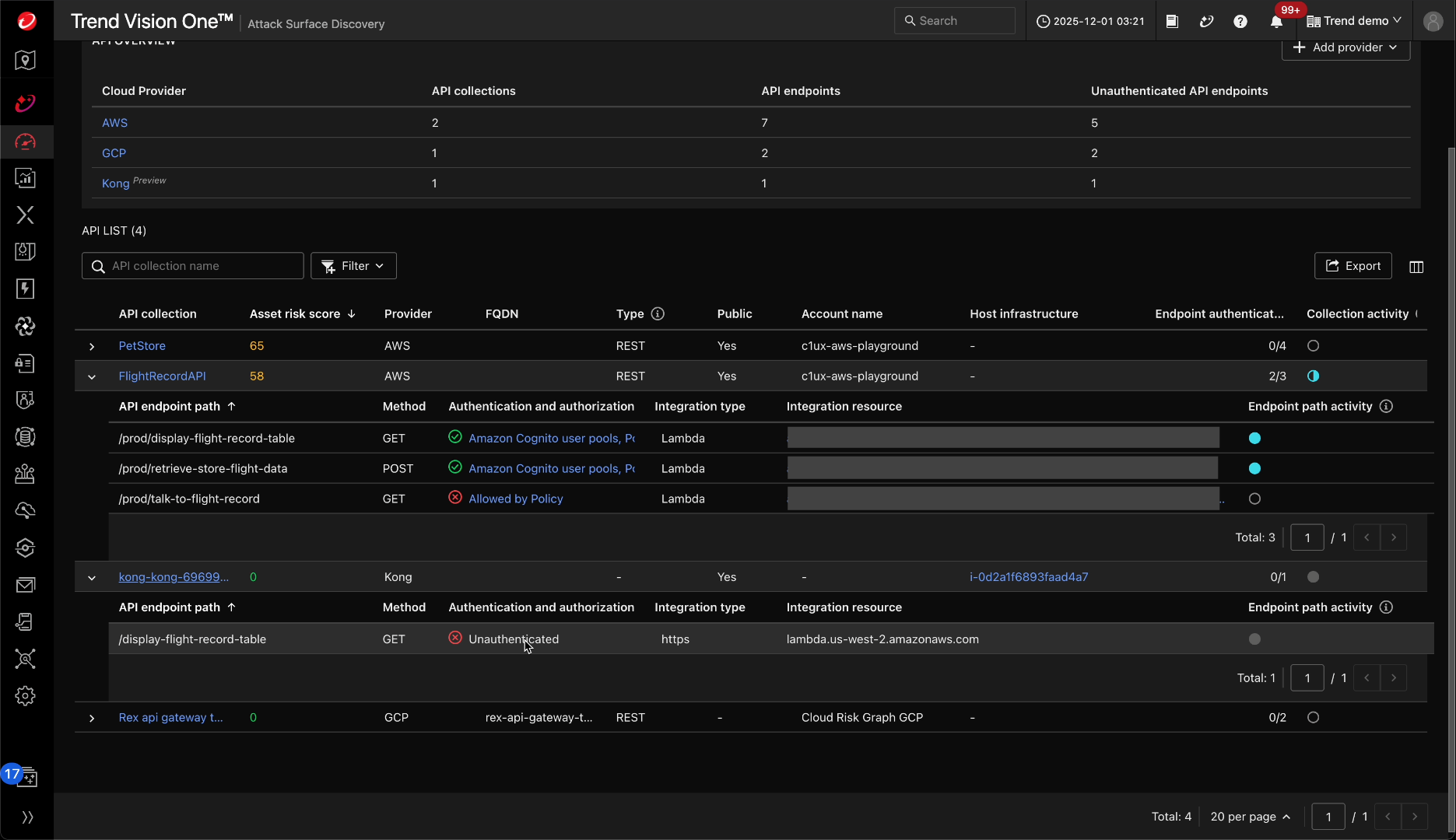
After configuring the integration, you can view your Kong Gateway API collections
and endpoints in Attack Surface Discovery. The API inventory includes risk insights such as asset risk scores based on misconfiguration
checks, authentication and authorization status, integration type and resource, API
activity in the past 30 days, and host infrastructure details.
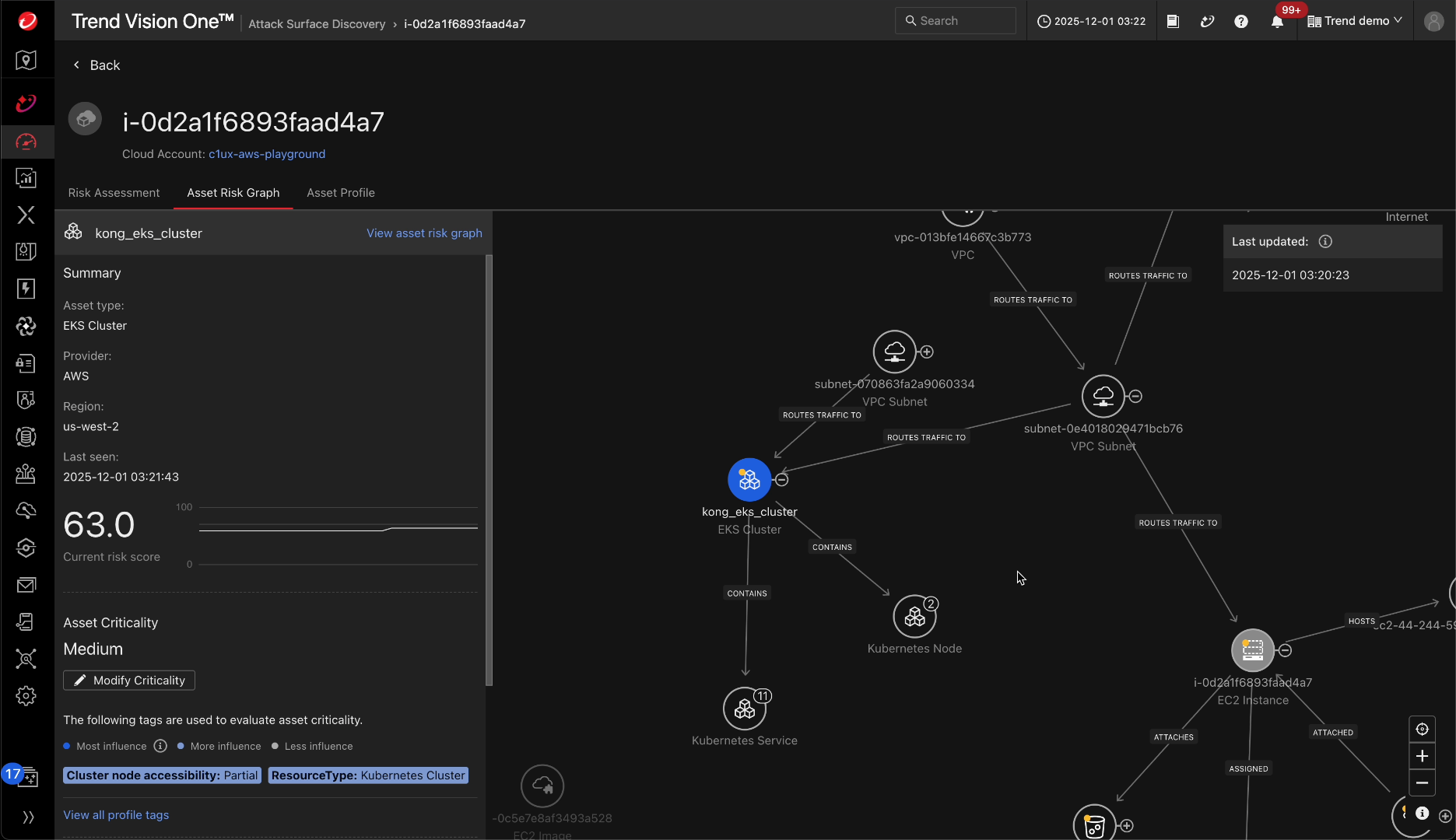
You can also view the asset risk graph of Kong Gateway's host infrastructure to understand
the relationship between host infrastructure resources in your cloud environment and
get a comprehensive risk overview of the cloud infrastructure linked with Kong Gateway.
|
NoteCloud Risk Management solutions connect cloud resources and Container Security solutions
connect Kubernetes resources including nodes, containers, images, and services.
|
For more information about the APIs page, see APIs.
|
Note
|
Procedure
- Contact your TrendAI Vision One™ account team or send a request to alloftrend3rdpartyintegrations@trendmicro.com to access the plugin and installation instructions.
- In the TrendAI Vision One™ console, generate the API key to authenticate with Kong Gateway.
- Go to .
- Locate and click the Kong Gateway card.
- Click Generate.
- From the Expiration time list, choose how long before the API key expires. The default value is one year.
- Click Add.
- Copy the API key value. This value will not be shown again. We recommended that you copy and paste this value in a text editor so you do not lose it.
- Click Close.
- Copy the Endpoint URL from the TrendAI Vision One™ console. You will need this URL and the API key you just generated when configuring the plugin in Kong Gateway.
- Install the TrendAI Vision One™ API Security plugin on Kong Gateway by downloading and mounting the plugin file on your Kong Gateway system, both control plane and dataplane.
- Configure the plugin with the Endpoint URL and API key from the TrendAI Vision One™ console.The following example shows a basic plugin configuration:
plugins: - name: trend-micro-kong-plugin-aps config: fqdn: <V1_ENDPOINT> token: <API_TOKEN_V1>Replace<V1_ENDPOINT>with the Endpoint URL and<API_TOKEN_V1>with the API key from step 1. The endpoint ensures data is routed to the appropriate data center based on the region of your TrendAI Vision One™ account.
Kong Gateway is added as a provider on the APIs screen in Attack Surface Discovery,
where you can view details of the individual API endpoints contained in the collection.